Every request becomes a task. Wherever it comes from.
Email, chat, alerts, Git and AI agents flow into a single queue, each item with an owner, a due date and a priority. Ordo organizes your company’s work and alerts the right person, on the right channel, before anything slips through.
Free for up to 3 people. No credit card required.
Start typing and watch Ordo understand.
Done. That’s how a task lands in Ordo, already organized.
Examples
The same sentence works on the web, in Telegram, in an email subject line, in Slack, in the extension and for AI agents.
Open Ordo and know what to do first.
Overdue, today, the next seven days and what just arrived — on one screen that works the same on desktop and mobile, even offline.
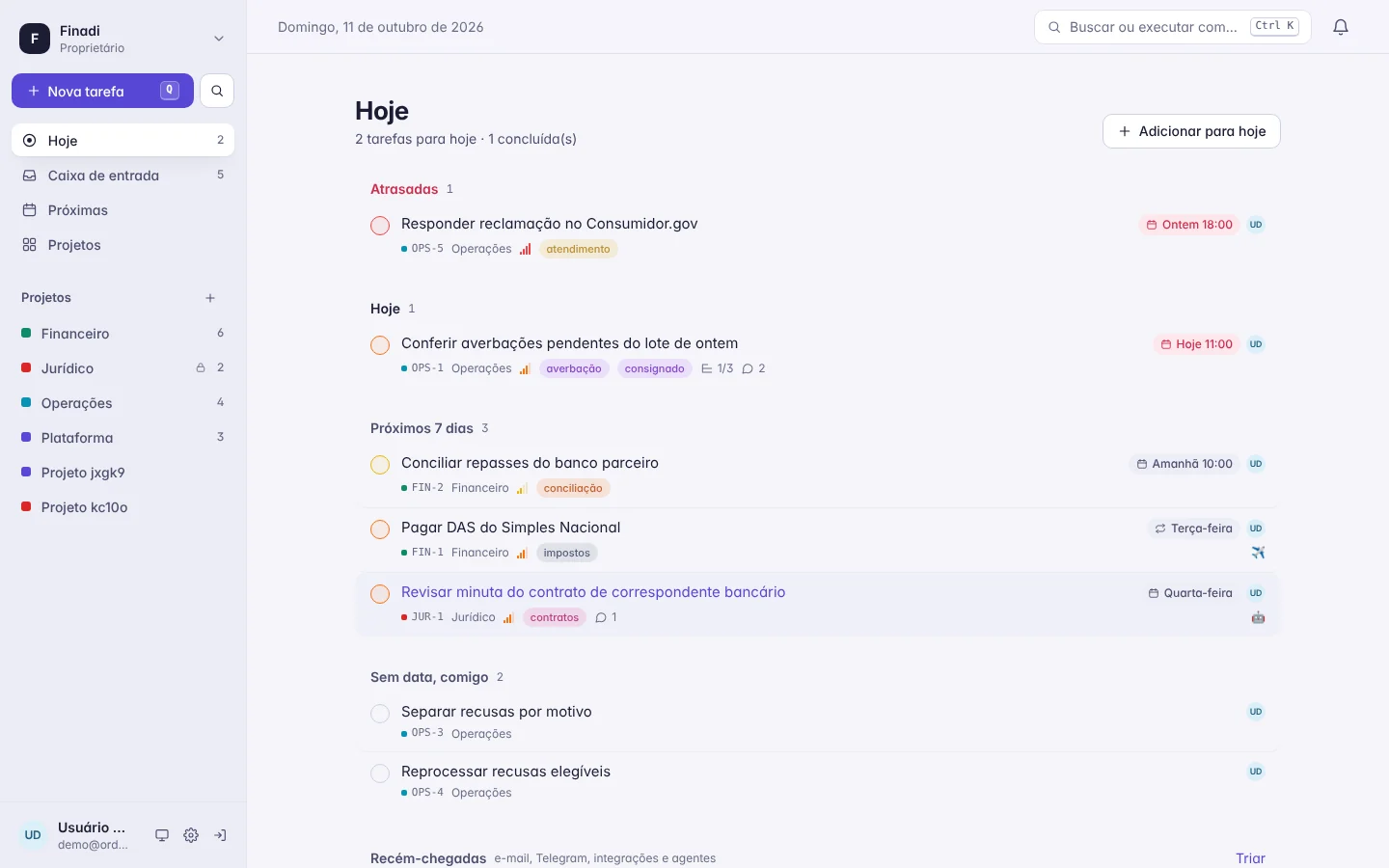
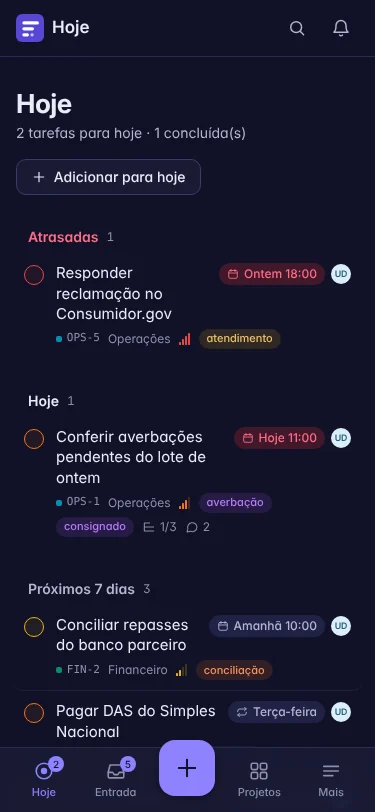
Today, Inbox and Upcoming
Everyone sees their own day. Managers see the whole team’s.
List, Kanban board and calendar
Custom statuses per project, subtasks, recurrence, attachments and watchers.
Installable app (PWA)
Works offline, lets you complete and snooze right from the notification and accepts “share” from any app.
Ten ways in. One queue.
Work starts outside your tools: in a customer’s email, a 2 a.m. alert, a “can you handle this?” in chat. Ordo meets it there, understands it, removes duplicates and hands it to the right owner.
-
One address per project. The subject becomes the task, attachments come along, and commands like /done and /due work right in your reply.
- Telegram
-
Message the bot and a task is born. Complete or snooze it with a tap.
- Slack and Google Chat
-
Turn a conversation into a task without leaving the channel.
- GitLab and GitHub
-
Turn a task into an issue in one click; “fixes OPS-12” in a commit closes the task.
- Alerts
-
Grafana, Sentry and Alertmanager, with deduplication and automatic closing when the alert resolves.
- Chrome extension
-
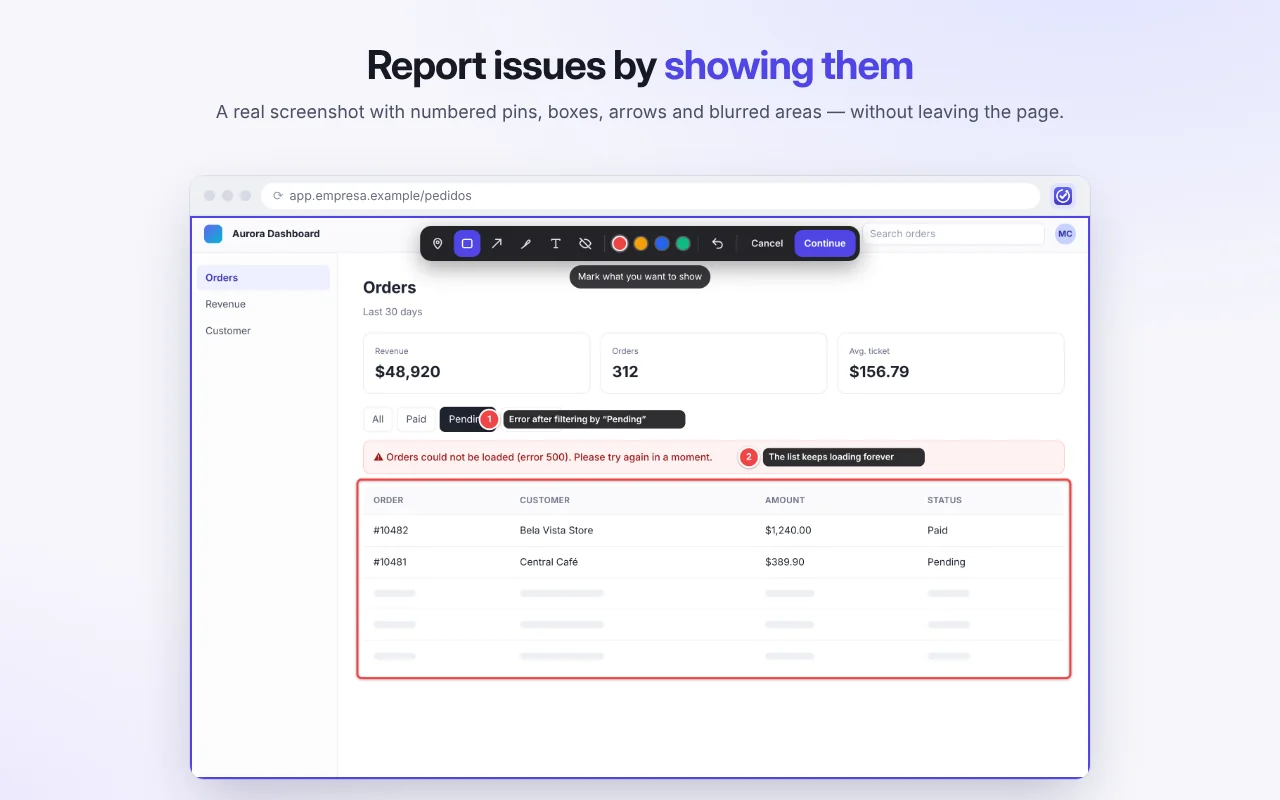
Turn any page into a task; report issues with an annotated screenshot.
- Feedback widget
-
Add one script to your site and every bug arrives with the screen, console and steps.
- Mobile
-
Share from any app straight to the installed Ordo app.
- API and webhooks
-
A documented REST API, signed outbound webhooks and ready-made recipes.
- AI agents (MCP)
-
Claude, Cursor and other agents create and complete tasks, fully audited.
Inbox
5-
October invoice attached
email[email protected]
-
High latency on the payments API
alertGrafana
-
Pay button not responding at checkout
widgetwebsite visitor
-
Break down declines by reason
agentClaude, on behalf of Ana
-
Approve the November campaign
chatSlack #marketing
Many companies. One login.
Holding company, corporate group, law firm or agency: each workspace has its own isolated data, roles, departments and tokens. Switch companies in one click, with no duplicate accounts.
- Owner, admin, member and guest roles
- Departments and confidential tasks even admins can’t read
- An audit trail for every workspace
- API tokens scoped to each company
AI agents on the team, with a badge and an audit trail.
Connect Claude, Cursor or any agent to Ordo’s native MCP server. They plan the day, triage, create subtasks and close out what they finish — and every action is logged as “agent on behalf of” a real person.
Only the access you grant
The agent uses a token with your permissions, in one specific workspace. Revoke it and it’s done.
Nothing disappears
The MCP server has no delete tool. Sensitive actions are flagged to the agent.
Your content stays yours
Ordo never sends anything to AI providers on its own and never uses your data to train models.
Audit log
-
A
Ana Souza assigned OPS-14 to Bruno person
-
Claude on behalf of Ana created 3 subtasks in OPS-14 agent
-
GitLab moved OPS-14 to Review (MR !231) integration
-
B
Bruno Lima completed OPS-14 by email person
claude mcp add --transport http ordo \
  https://app.ordopath.com/mcp \
  --header "Authorization: Bearer $ORDO_TOKEN"
Quiet when it can be. Persistent when it has to be.
Everyone chooses how they want to be notified — in the app, by push, Telegram, email or SMS — and when they want quiet. When something urgent goes unseen, Ordo escalates it on its own.

-
The alert fires
Grafana triggers. Ordo creates an urgent task in the infrastructure project and assigns it to whoever is on call.
-
Notified on the preferred channel
Push and Telegram for the on-call engineer, while everyone else’s quiet hours are respected.
-
Still unseen? Escalate
Fifteen minutes without a read: SMS and Telegram to the owner and their manager.
-
The reply becomes a comment
The owner answers the email from bed. The reply lands on the task.
-
It closes itself
The alert resolves and the task is completed automatically, with everything on record.
A service desk that keeps its promises.
A portal where your customers open and track requests, SLAs that account for holidays, automatic assignment, satisfaction surveys and a TV dashboard so your operations team can follow along in real time.
- Customer portal with passwordless sign-in via email link
- SLAs by priority, with a holiday calendar
- Satisfaction survey (CSAT) on completion
- TV dashboard and service desk reports

Bugs that arrive already explained.
The feedback widget and the extension send a screenshot with numbered pins, the console log, failed requests and attachments. Passwords and data such as tax IDs, emails and card numbers are masked or removed before anything is sent.
Business and engineering in the same conversation.
Finance doesn’t need to open Jira, and developers don’t need yet another list. A task becomes an issue in one click, and the status syncs back on its own.
-
1
Task
Legal requests a change to the digital contract.
-
2
Issue
One click creates the issue in GitLab or GitHub, linked back to the task.
-
3
Review
Opening a merge request moves the task to Review.
-
4
Done
Merging with “fixes LEG-7” completes the task and notifies whoever asked.
Security and privacy with answers, not promises.
Built in Brazil for the LGPD and ready for GDPR and CCPA. Your legal and security teams will find everything they need to verify right here.
Explore our security practicesPer-company isolation
Each workspace sees only its own data, backed by automated isolation tests.
Minimal Sign in with Google
Just your name, email and photo. Never Gmail, Drive or Calendar.
Who did what
The audit log tells people, integrations, AI agents and the system apart.
Cloud or self-hosted
Use Ordo in the cloud or run it on your own infrastructure, with MariaDB or PostgreSQL.
Start free. Grow without switching tools.
See all plansFree
For organizing a small team and proving the value.
US$ 0 forever
Pro
For teams fielding requests from every direction.
US$ 8 per user/month
Business
For operations with SLAs, customers and audit needs.
US$ 16 per user/month
Enterprise
For corporate groups, regulated industries and teams that want to self-host.
Contact us
Frequently asked questions
Do I need to switch tools to use Ordo?
No. Ordo can be the layer that receives and organizes requests and, when the work is technical, opens the issue in GitLab or GitHub and tracks its status back.
Is my data used to train AI?
No. Ordo doesn’t use customer content to train models, doesn’t sell data and never sends anything to AI providers on its own. If you connect an agent via MCP, it can access only what its token allows.
Is Ordo compliant with the LGPD and GDPR?
Yes. We act as the processor of your workspace data, with a Data Processing Agreement, a public subprocessor list, a Data Protection Officer and standard contractual clauses for international transfers.
Can I run Ordo on my own servers?
Yes. The same code runs in the cloud or on your infrastructure, with MariaDB, PostgreSQL or SQLite. Supported self-hosting is part of the Enterprise plan.
Which languages does Ordo support?
Portuguese, English and Spanish — across the app, emails, bots and the parser that understands your task sentences.
How does the Chrome extension handle my data?
It reads the page only when you trigger it and sends everything solely to the Ordo server you configured. It has no analytics or tracking, and it doesn’t use your Google account.
Bring order to your company’s work today.
Create a workspace in under a minute, invite your team and connect your first channel. When you need more, we’ll grow with you.
Free for up to 3 people. No credit card required.